
ESP32 BLE proxy
An ESP32 near the scale relays its advertisements and GATT traffic to BLE Scale Sync over MQTT, so the server needs no Bluetooth adapter. All scale logic stays on the server. Compare it with the other transports under Choose a transport.
Requirements
- A classic ESP32 or ESP32-S3 board from the list below. ESP32-C3 and ESP32-C6 use a different BLE stack in MicroPython and are not tested.
- A 2.4 GHz Wi-Fi network that the ESP32 and BLE Scale Sync both reach.
- An MQTT broker, or the embedded broker of BLE Scale Sync.
- A USB cable, and Python 3.10 or newer for the flash tools.
- Continuous mode (
runtime.continuous_mode: trueorCONTINUOUS_MODE=true). The ESP32 connects to the scale on its own, and only a continuous-mode app can take that connection. Without it the app warns at startup.
Supported boards
| Board | Price | PSRAM | Notes |
|---|---|---|---|
| M5Stack Atom Echo (ESP32-PICO) | about 8 EUR | No | I2S buzzer for beep feedback |
| Generic ESP-WROOM-32 dev board | about 5 EUR | No | No display |
| ESP32-S3-DevKitC | about 12 EUR | Yes | |
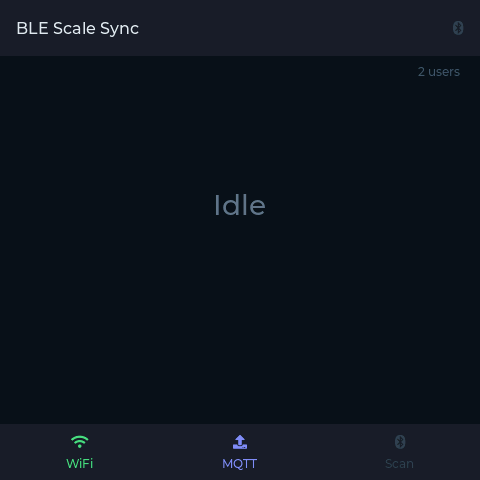
| Guition ESP32-S3-4848S040 | about 25 EUR | Yes | 480x480 display with scan status and export results |
| Scale type | Examples | No-PSRAM board | PSRAM board |
|---|---|---|---|
| Broadcast (reading in the advertisement) | Mi Scale 2, Xiaomi S800 | Yes | Yes |
| GATT (needs a connection) | Yunmai, Inlife, Eufy T9120, QN / Renpho ES-CS20M | No, the connect is skipped | Yes |
A GATT connection comes from the ESP-IDF heap, which Wi-Fi and MQTT leave nearly empty on a board without PSRAM. There the firmware refuses the connect and keeps scanning.
Flash the firmware
1. Install the host tools
Clone the repository and change into firmware/. Every later step runs from there:
git clone https://github.com/KristianP26/ble-scale-sync.git
cd ble-scale-sync/firmware
For a virtual environment, create it now (python -m venv venv) and activate it: source venv/bin/activate on macOS and Linux, source venv/Scripts/activate in Git Bash, venv\Scripts\Activate.ps1 in PowerShell. Then install the flash tools:
pip install -r requirements-flash.txt2. Configure
cp config.json.example config.jsonEdit config.json:
{
  "board": null,
  "wifi_ssid": "MyNetwork",
  "wifi_password": "YOUR_WIFI_PASSWORD",
  "mqtt_broker": "192.168.1.100",
  "mqtt_port": 1883,
  "mqtt_user": null,
  "mqtt_password": null,
  "mqtt_tls": false,
  "mqtt_ca_file": null,
  "mqtt_tls_hostname": null,
  "device_id": "esp32-ble-proxy",
  "topic_prefix": "ble-proxy"
}
With "board": null the board is detected from the chip. Detection cannot tell a WROOM-32 from an Atom Echo, so on a WROOM-32 set "board": "esp_wroom_32" or pass --board esp_wroom_32 to flash.sh. Other values: atom_echo, esp32_s3, guition_4848.
3. Flash
Connect the ESP32 over USB and run the script:
./flash.sh               # erase, MicroPython, libraries, app
./flash.sh --app-only    # re-upload the app only
./flash.sh --libs-only   # reinstall the MicroPython libraries only
The script detects the serial port. Override it with PORT=/dev/ttyACM0 ./flash.sh; ./flash.sh --help lists the options.
The Guition 4848 needs a custom LVGL MicroPython build first: cd ../drivers && ./build.sh guition_4848, then cp build/firmware.bin ../firmware/firmware_guition_4848.bin, see PORTING.md.
On Windows, run flash.sh in Git Bash from Git for Windows, with the port from Device Manager under Ports (COM & LPT): PORT=COM3 ./flash.sh. WSL works too once the USB device is attached with usbipd.
Flash by hand from CMD or PowerShell
esptool and mpremote run on any OS. This example is for an ESP32-S3. Download the MicroPython .bin for your board from micropython.org first, and adjust --chip, the file name and board_*.py (see configure_board() in flash.sh):
esptool --chip esp32s3 --port COM3 erase-flash
esptool --chip esp32s3 --port COM3 --baud 460800 write-flash 0x0 ESP32_GENERIC_S3-SPIRAM_OCT-20251209-v1.27.0.bin

mpremote connect COM3 mip install "aioble@0.6.2"
mpremote connect COM3 mip install "github:peterhinch/micropython-mqtt@70b56a7a4aaf"
mpremote connect COM3 mip install "github:peterhinch/micropython-async/v3/primitives@68b5f01e999b"

mpremote connect COM3 cp config.json :config.json
mpremote connect COM3 cp boot.py :boot.py
mpremote connect COM3 cp board.py :board.py
mpremote connect COM3 cp board_esp32_s3.py :board_esp32_s3.py
mpremote connect COM3 cp ble_bridge.py :ble_bridge.py
mpremote connect COM3 cp beep.py :beep.py
mpremote connect COM3 cp main.py :main.py
mpremote connect COM3 reset
4. Verify
Open the serial console with mpremote connect /dev/ttyUSB0 repl. Once Wi-Fi and MQTT are up it prints:
BLE-MQTT bridge ready: ble-proxy/esp32-ble-proxyThe status topic shows it from the broker side:
mosquitto_sub -h 192.168.1.100 -t 'ble-proxy/esp32-ble-proxy/status' # prints: onlineConfigure BLE Scale Sync
ble:
  handler: mqtt-proxy
  mqtt_proxy:
    broker_url: 'mqtt://192.168.1.100:1883'
    device_id: esp32-ble-proxy # must match config.json
    topic_prefix: ble-proxy # must match config.json
    # username: myuser
    # password: '${MQTT_PASSWORD}'
Restart BLE Scale Sync. ble-scale-sync setup (npm run setup from a clone) asks for the same values. The broker of the MQTT exporter can serve the proxy too.
broker_url takes mqtts:// for TLS, which covers only the server's own connection. For TLS on the ESP32's connection, set in config.json:
"mqtt_tls": true;"mqtt_ca_file": a CA certificate file infirmware/, whichflash.shuploads with the app. Without it the link is encrypted but the broker is not verified;"mqtt_tls_hostname": the broker's certificate name, whenmqtt_brokeris an IP address.
Embedded broker
Leave out broker_url and BLE Scale Sync starts its own broker. Point mqtt_broker in the ESP32 config.json at this machine's LAN address.
ble:
  handler: mqtt-proxy
  mqtt_proxy:
    device_id: esp32-ble-proxy
    topic_prefix: ble-proxy
    embedded_broker_port: 1883 # default
    embedded_broker_bind: 0.0.0.0 # default, all interfaces
    username: myuser # required unless bound to loopback
    password: '${MQTT_PASSWORD}'
The schema rejects an embedded broker on a non-loopback address without username and password. If another broker already holds port 1883, startup fails: set embedded_broker_port to a free port such as 1884, and the same mqtt_port in config.json. Allow the port through the host firewall.
Home Assistant add-on
In the add-on, set Bluetooth transport to mqtt-proxy and pick the broker with ESP32 proxy broker:
shared(default) uses the broker of the add-on's MQTT options, which is the Mosquitto broker add-on when MQTT auto-detection is on, even with the MQTT exporter off. Give the ESP32 its own login on that broker (a Home Assistant user, or an entry underloginsin the Mosquitto add-on) and put it inmqtt_userandmqtt_passwordofconfig.json.embeddedstarts the broker inside the add-on. Embedded broker username and Embedded broker password are required, since it listens on the host network. The Mosquitto add-on holds port 1883 on the host, so set Embedded broker port to a free one such as1884and the samemqtt_portinconfig.json.
mqtt_broker in config.json is the Home Assistant host's IP address for the Mosquitto add-on and for embedded, or the broker's own address when you set one by hand. ESP32 proxy device ID and ESP32 proxy topic prefix must match device_id and topic_prefix.
Docker
The container needs no host network, D-Bus mount or NET_ADMIN. Use the repository's docker-compose.mqtt-proxy.yml:
docker compose -f docker-compose.mqtt-proxy.yml up -dWith the embedded broker, publish its port: add ports: ['1883:1883'] to the service.
Behavior
Scale --BLE--> ESP32 --MQTT--> broker --MQTT--> BLE Scale SyncThe ESP32 scans in a loop and publishes what it sees to scan/results. An ESP32-S3 scans without pause and publishes every 2 s. A classic ESP32 scans for 5 s (WROOM-32) or 8 s (Atom Echo), publishes, and waits 5 s, so results arrive every 10 to 13 s. On these shared-radio boards BLE is switched off after each scan so Wi-Fi can recover. The firmware beeps when it sees a scale the server has told it about.
A broadcast scale, such as the Xiaomi Mi Scale 2, is read from its advertisements and never connected, even when it also offers a GATT service. The server learns which scales are broadcast scales while it runs and forgets them on restart. After a restart the ESP32 can try one connection to a known scale (from ble.scale_mac or an earlier reading) before an advertisement identifies it. A scale that accepts the connection is dropped as soon as its characteristics identify it. A scale that never accepts one, such as the Silvergear 108 or the AAA00x scales, holds the ESP32 for up to about 30 s with scanning paused, and the first weigh-in after a restart can be lost. If every scale on the proxy is a broadcast scale, set auto_connect: false under mqtt_proxy.
A GATT scale is connected by the ESP32 itself the moment it sees a known scale's MAC (auto_connect, on by default). The ESP32 reports the characteristics, the server subscribes and writes the commands the scale needs, readings arrive as notifications, and the server sends disconnect when the reading is complete. With auto_connect: false the server sends connect instead, which adds an MQTT round trip that a fast-sleeping scale can miss. If the scale is still on afterwards, see When a session ends.
The ESP32 forwards the notifications of each characteristic in the order they arrive. If publishing to MQTT stalls, it holds up to 16 notifications per characteristic, then drops the oldest and prints Notify ...: queue full, ... on the serial console.
The firmware ends a GATT session and resumes scanning when the link is down, when the server has not engaged within 20 s, or after 3 minutes. It prints GATT session guard: ... on the serial console.
MQTT topics
All topics start with {topic_prefix}/{device_id}/ (default ble-proxy/esp32-ble-proxy/).
| Topic | Direction | Payload |
|---|---|---|
status | ESP32 -> Server | "online" / "offline" (retained, LWT) |
error | ESP32 -> Server | JSON with op (connect, auto-connect, scan, subscribe, write, read, command), message and, where it applies, address / uuid |
scan/results | ESP32 -> Server | JSON array of discovered devices |
config | Server -> ESP32 | Retained JSON: scales (MACs), users, passive (MACs read from advertisements, never connected), autoConnect (false disables the autonomous connect), lazy_notify (true: enable a notification only on subscribe/{uuid}) |
beep | Server -> ESP32 | Empty, or JSON with freq (20 to 4000 Hz), duration (1 to 500 ms), repeat (1 to 3); values outside are clamped |
display/reading | Server -> ESP32 | JSON with user slug, name, weight, impedance and exporter list |
display/result | Server -> ESP32 | JSON with user slug, name, weight and per-exporter results |
connect | Server -> ESP32 | JSON with address and addr_type |
connected | ESP32 -> Server | JSON with address, the discovered chars (uuid and properties), and autonomous: true when the ESP32 connected on its own |
disconnect | Server -> ESP32 | Any payload |
disconnected | ESP32 -> Server | Empty |
subscribe/{uuid} | Server -> ESP32 | Empty; enables the notification on that characteristic (with lazy_notify) |
notify/{uuid} | ESP32 -> Server | Raw bytes of a notification |
write/{uuid} | Server -> ESP32 | Raw bytes to write |
read/{uuid} | Server -> ESP32 | Empty; triggers a read |
read/{uuid}/response | ESP32 -> Server | Raw bytes read |
screenshot | Server -> ESP32 | Display boards: request a framebuffer dump. Refused (an error with op: "screenshot") during a BLE connection |
screenshot/info, screenshot/{n}, screenshot/done | ESP32 -> Server | Display size and format, the RGB565 framebuffer in numbered chunks, then the chunk count |
The firmware files are described in firmware/ in the repository.
Troubleshooting
Unlock write every 3 s, then "GATT session cap exceeded" after 90 s
The ESP32 connected to a broadcast scale such as the Mi Scale 2. The server drops the connection, logs Autonomous connect to Xiaomi Mi Scale 2 (...) ignored: this scale is read from its advertisements, not over GATT and tells the ESP32 to stop connecting to it; after a restart this can happen once more (see Behavior). If it repeats on every weigh-in, flash the current firmware. If every scale on the proxy is a broadcast scale, set auto_connect: false under mqtt_proxy.
ESP32 shows "online" but scans find nothing
Move the ESP32 closer to the scale: small boards such as the Atom Echo have a short range. Some scales advertise only while the display is lit, so step on the scale during a scan. The first scan after boot can time out after 30 s while the ESP32 joins Wi-Fi; later scans arrive at the normal interval.
MemoryError or a refused GATT connect on a board without PSRAM
A board without PSRAM has little heap left once Wi-Fi and MQTT run. The serial console prints the ESP-IDF heap before each connect, and a refused connect looks like this:
IDF heap too low for GATT connect: free=<bytes> largest=<bytes> (#139); use an ESP32-S3 / PSRAM board for GATT-connect scalesA small largest means the board is out of RAM: use a PSRAM board for GATT scales. A healthy largest with a connect timeout points at radio contention; move the board closer to the scale. For a MemoryError during scans, lower SCAN_DURATION_MS in the board's board_*.py so a scan collects fewer devices.
A GATT scale is never read
- Set
ble.scale_mac. The ESP32 connects only to MACs the server has sent it, and without one the server falls back to a slower host-initiated connect after a few scan cycles. - Run the server in continuous mode. If the server does not engage with a session, the firmware ends it after 20 s (
GATT session guard: ...) and the reading is lost. - If the serial console logs
GATT connect attempt ... failed ... TimeoutErroron every weigh-in, flash the current firmware: it retries a timed-out connect once with the other address type, which a scale with a random address needs. - If the scale shows its result but the session ends with
GATT reading timeout for ...orGATT session cap exceeded for ..., flash the current firmware (./flash.sh --app-onlyis enough): it forwards every notification of a burst, and some scales send their result as several in a row.